Flash Xiaomi Redmi 2 / Prime

12:26:00 PM 0
How To Flash Xiaomi Redmi 2 / Prime 4G Global ROM Using Method Fastboot


You must download : 
*Mi Flash Tool  
*MiPC Suite (for driver your phone) 
*Firmware Redmi 2/Prime Stable Version (Global) V6.6.8.0.KHJMICF 

Backup your data in internal tephone because it will be erased all

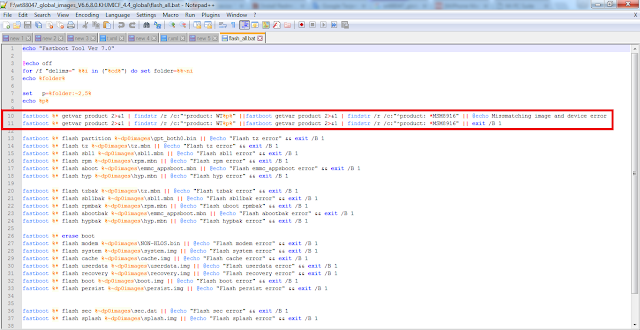
1; Extract wt88047_global_images_V6.6.8.0.KHJMICF_4.4_global.tgz after extracted open the folder and edit file flash_all.bat and delete the script using notepad/ notepad ++

http://wsablog2an.blogspot.com/2016/04/flash-xiaomi-redmi-2-prime.html

2; Instal MiPhoneFlash20151028.exe and MiSetup.exe

3; Turn off your phone and enter Fastboot Method  (press the vol  down(-) and press power buton) until the image appears below.


http://wsablog2an.blogspot.com/2016/04/flash-xiaomi-redmi-2-prime.html

4; Open MiFlash.exe if not found in your desktop/star button you can open in  
C:\Program Files (x86)\Xiaomi\MiPhone (Windows 64bit)
C:\Program Files\Xiaomi\MiPhone (Windows 32bit)

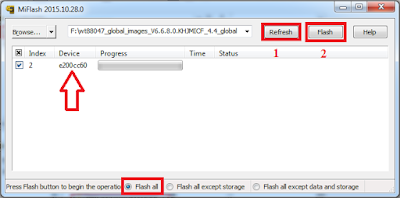
5; Browse file wt88047_global_images_V6.6.8.0.KHJMICF_4.4_global that you extract and you must select folder wt88047_global_images_V6.6.8.0.KHJMICF_4.4_global not folder images.

http://wsablog2an.blogspot.com/2016/04/flash-xiaomi-redmi-2-prime.html


http://wsablog2an.blogspot.com/2016/04/flash-xiaomi-redmi-2-prime.html


6; In MiFlash click button Refresh to detect your phone, after detected click button Flash(for start your process flashing)

http://wsablog2an.blogspot.com/2016/04/flash-xiaomi-redmi-2-prime.html

http://wsablog2an.blogspot.com/2016/04/flash-xiaomi-redmi-2-prime.html

7;  After done telephone automatic restart, in this process we will wait +- 10 minute.

8; And Done.


Tested On Xiaomi Redmi 2 and 2 Prime (Device Build 2014817&2014811)

Thank's to MIUI Forum


Update Redmi 2 / Prime to MIUI 7.2.1

10:32:00 PM 0
How To Update Xiaomi Redmi 2 / Prime to MIUI 7.2.1 (Stable Kitkat)

Additional Features on unofficial global :

Include Indonesia language
Include Gapps(google apps)
Include xposed
Include plak(FC)

You must download : 
*MIUI 7.2.2.zip (unofficial global)
*MIUI 7.2.1.zip (official global)

1; Go to Settings > About phone >  System updates.


http://wsablog2an.blogspot.com/2016/04/update-redmi-2-prime-to-miui-722.html


2; Select Choose Update Package > search the file MultyRom_ModBy_Rey_Ardian_4.4_HM2014811_V7.2.2.0.KHJCNDA.zip and click.

http://wsablog2an.blogspot.com/2016/04/update-redmi-2-prime-to-miui-722.html

http://wsablog2an.blogspot.com/2016/04/update-redmi-2-prime-to-miui-722.html

3; After selected phone will reboot and execute the file, wait this process to 100%.

4; And Done.

http://wsablog2an.blogspot.com/2016/04/update-redmi-2-prime-to-miui-722.html

If no signal you can see Here

If  you not found GAPPS(google apps)  you can download A-GAPPS 6.0.1_01032016_4.2.zip (tested by me) Source XDA 


Tested On Xiaomi Redmi 2 (Kitkat Device Build 2014817)

Thank's to Facebook Group and MIUI Forum

Device ID Redmi 2 / Prime

9:08:00 PM 0
How To Know Device ID on Xiaomi Redmi 2 / Prime And All Xiaomi 2014811 or HM2014817 and etc using Device ID


http://wsablog2an.blogspot.com/2016/04/device-id-redmi-2-prime.html


Download Device ID.apk


Tested On Xiaomi Redmi 2 and 2 Prime (MIUI 6.6&7.1&7.2 Kitkat & Lollipop Device Build 2014817&2014811)

No Signal Redmi 2 / Prime

8:03:00 PM 0

How To Fix No Signal On Xiaomi Redmi 2 and 2 Prime

This tutorial for Fix No Signal On Xiaomi Redmi 2 and 2 Prime after update/ upgrade/ flashing using TWRP, Okay directly to tutorial

You must download file and puts to sdcard/phone (put out a folder) :
*TWRP Mod v3.0.0.0 Support Kitkat Lollipop Marshmallow
*NON-HLOS_2014811-signed.zip (for device build 2014811
*NON-HLOS_2014817-signed.zip (for device build 2014817)

For device build 2014813 or 2014818 or 2014812 or 2014821 or 2014816 or 2014819 can try this file NON-HLOS1.zip or NON-HLOS2.zip  and puts to sdcard/phone (put out a folder)

How to know you device build click here


http://wsablog2an.blogspot.com/2016/04/no-signal-redmi-2-prime.html


1; Turn off your phone and boot into TWRP (press the voll +(up) and vol down(-) and power buton +- 3second )


2; In TWRP select Instal > Select Storage and browse your file NON-HLOS.zip and swipe button to flash file.

3; Reboot System and Done.


Tested By Me In Xiaomi Redmi 2 and 2 Prime (MIUI 6.6 & 7.1 & 7.2 Kitkat 2014817 & 2014811)

Thank's to Facebook Group


Install TWRP Redmi 2 / Prime

1:57:00 PM 0

How To Install TWRP On Xiaomi Redmi 2 and 2 Prime


This tutorial for Insatall TWRP On Xiaomi Redmi 2 and 2 Prime using System Update via  Recovery Mi, Okay directly to tutorial


Attention!!!
To avoid things that are not desirable (ex: bootloop) you have to backup the internal data telephone (ex: contacts, messaging, images, music, notes and etc)


For Android 4.4 (Kitkat)

You must download file :
*Update.zip  puts to sdcard/phone (put out a folder)


Installation :
1; Turn off your internet connection.

2; Go to Settings > About phone >  System updates or you can open applicaton Updater


http://wsablog2an.blogspot.com/2016/04/instal-twrp.html


3; Select Choose Update Package > search the file Update.zip and click.


http://wsablog2an.blogspot.co.id/2016/04/instal-twrp.html


http://wsablog2an.blogspot.co.id/2016/04/instal-twrp.html

4; After selected phone will reboot and execute this file, wait this process to 100%.

5; And Done.


For Android 5.1 (Lollipop)

Click here

Update TWRP Mod v3.0.0.0 Support Kitkat Lollipop Marshmallow (The Best TWRP, in my opinion)

Click here


Tested By Me In Xiaomi Redmi 2 and 2 Prime (MIUI 6.6 & 7.1 & 7.2 Kitkat Device Build 2014817 2014811)

Thank's to Facebook Group

Root Redmi 2 / Prime

8:01:00 PM 0

How To Root Xiaomi Redmi 2 and 2 Prime and 2 Pro Kitkat


This tutorial for Root Xiaomi Redmi 2 and 2 Prime and 2 Pro using System Update via TWRP, Okay directly to tutorial

Attention!!!
To avoid things that are not desirable (ex: bootloop) you have to backup the internal data telephone (ex: contacts, messaging, images, music, notes and etc)


For Android 4.4 (Kitkat)

In the update.zip file already include TWRP v2.8.7.2

You must download file :
*update.zip  puts to sdcard/phone (put out a folder)
*Root.zip  puts to sdcard/phone (put out a folder)


Installation :
1; Turn off your internet connection.

2; Go to Settings > About phone >  System updates or you can open applicaton Updater

http://wsablog2an.blogspot.co.id/2016/04/root-redmi-2.html

3; Select Choose Update Package > search the file update.zip and click.

http://wsablog2an.blogspot.co.id/2016/04/root-redmi-2.html

http://wsablog2an.blogspot.co.id/2016/04/root-redmi-2.html

4; After selected phone will reboot and execute the file, wait this process until 100%.

5; After Done, turn off your phone and boot into TWRP (press the voll +(up) and vol down(-) and power buton +- 3second )

6; In TWRP select Instal > Select Storage and browse your file Root.zip and swipe button to flash file.

http://wsablog2an.blogspot.com/2016/04/root-redmi-2-prime.html


7; Reboot System and Done.


For Android 5.1 (Lollipop)

Click here

Update TWRP Mod v3.0.0.0 Support Kitkat Lollipop Marshmallow (The Best TWRP, in my opinion)
Click here

Tested By Me In Xiaomi Redmi 2 and 2 Prime (MIUI 6.6 & 7.1 & 7.2 Kitkat Device Build 2014817 2014811)

Thank's to Facebook Group