Showing posts with label Root/CWM/TWRP. Show all posts

TWRP Mod v3.0.0.0

1:52:00 PM 1

How To Install TWRP on Xiaomi Redmi 2 and Prime Kitkat Lollipop Marshmallow


This tutorial for Install TWRP v3.0.0.0 Kumanjaya Mod by Rivv on Xiaomi Redmi 2 and 2 Prime Kitkat Lollipop Marshmallow using CWM/TWRP or Fastboot or Application Rashr, Okay directly to tutorial.

Attention!!!
To avoid things that are not desirable (ex: bootloop) you have to backup the internal data telephone (ex: contacts, messaging, images, music, notes and etc)


You must download file :

For Install Via Mi Recovery (Stock Recovery From MIUI only kitkat) (Tested By Me)
*update.zip  puts to sdcard/phone (put out a folder)
*HM11_17_TWRP3.0.0.0 Kumajaya Mod 20160419 by Rivv.zip  puts to sdcard/phone (put out a folder)
*HM13_TWRP3.0.0.0 Kumajaya Mod 20160419 by Rivv.zip  puts to sdcard/phone (put out a folder)

For Install Via TWRP (Tested By Me)
*HM11_17_TWRP3.0.0.0 Kumajaya Mod 20160419 by Rivv.zip  puts to sdcard/phone (put out a folder)
*HM13_TWRP3.0.0.0 Kumajaya Mod 20160419 by Rivv.zip  puts to sdcard/phone (put out a folder)

For Install Via Fastboot (Tested By Me)
*MiPC Suite (for driver your phone to connect to PC)
*HM11_17_TWRP3.0.0.0 Kumajaya Mod 20160419 by Rivv fastboot
*HM13_TWRP3.0.0.0 Kumajaya Mod 20160419 by Rivv fastboot

For Install Via App Rashr (Tested By Me) need root access
*Rashr.apk
*recovery 11 17.img
*recovery 13.img


Installation :

Via Mi Recovery (Stock Recovery From MIUI)
1; Turn off your internet connection.

2; Go to Settings > About phone >  System updates or you can open applicaton Updater

http://wsablog2an.blogspot.co.id/2016/04/root-redmi-2.html

3; Select Choose Update Package > search the file update.zip and click.

http://wsablog2an.blogspot.co.id/2016/04/root-redmi-2.html

http://wsablog2an.blogspot.co.id/2016/04/root-redmi-2.html

4; After selected phone will reboot and execute the file, wait this process until 100%.

5; After Done, turn off your phone and boot into TWRP (press the voll +(up) and vol down(-) and power buton +- 3second )

6; In TWRP select Instal > Select Storage and browse your file TWRP Mod.zip (file that was downloaded earlier) and swipe button to flash file.

7; Reboot System and Done.


Via TWRP

1; Turn off your phone and boot into TWRPTWRP (press the voll +(up) and vol down(-) and power buton +- 3second )

2; In TWRP select Instal > Select Storage and browse your file TWRP Mod.zip (file that was downloaded earlier) and swipe button to flash file.

3; Reboot System and Done.


Via Fastboot

1; Instal MiPC Suite, after done restart pc.


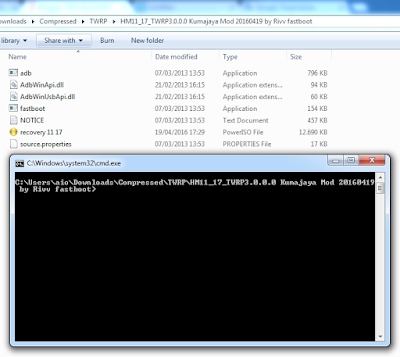
2; Extract TWRP after extracted, open folder and Press Button Shift + Right Click on mouse/touchpad and select Open Command Windows Here and will open a command prompt window.


http://wsablog2an.blogspot.com/2016/04/install-twrp-redmi-2-prime-lollipop.html

http://wsablog2an.blogspot.com/2016/04/install-twrp-redmi-2-prime-lollipop.html

3; Turn off your phone and boot into fastboot mode (Press Vol down (-) and the Power button) and connect it to the PC and wait for the drivers installed automatically.

4; In the CMD (command prompt) write fastboot devices and will be like the picture below.

http://wsablog2an.blogspot.com/2016/04/install-twrp-redmi-2-prime-lollipop.html

5; Write again fastboot flash recovery recovery.img if successful it will be like the picture below.

http://wsablog2an.blogspot.com/2016/04/install-twrp-redmi-2-prime-lollipop.html

6; Turn off the phone by removing the battery and enter TWRP (press button vol + (up) and button vol down (-) and press the power button) and release the power button when vibrating.


Via App Rashr

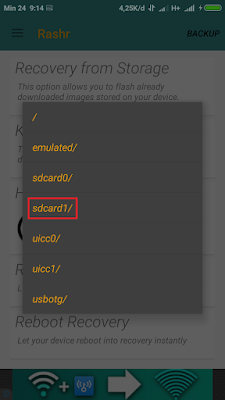
1; Instal Rashr.apk

http://wsablog2an.blogspot.com/2016/04/install-twrp-redmi-2-prime-lollipop.html

http://wsablog2an.blogspot.com/2016/04/install-twrp-redmi-2-prime-lollipop.html

http://wsablog2an.blogspot.com/2016/04/install-twrp-redmi-2-prime-lollipop.html

http://wsablog2an.blogspot.com/2016/04/install-twrp-redmi-2-prime-lollipop.html

http://wsablog2an.blogspot.com/2016/04/install-twrp-redmi-2-prime-lollipop.html

http://wsablog2an.blogspot.com/2016/04/install-twrp-redmi-2-prime-lollipop.html

http://wsablog2an.blogspot.com/2016/04/install-twrp-redmi-2-prime-lollipop.html


2; And Done.


Tested By Me On Xiaomi Redmi 2 (MIUI 7.2 & 7.3  Kitkat Lollipop Marshmallow Device Build 2014817)

Install TWRP Redmi 2 / Prime Lollipop

8:52:00 PM 2

How To Install TWRP on Xiaomi Redmi 2 and Prime Lollipop


This tutorial for Install TWRP v3.0.0.0 Kumanjaya Mod by Rivv on Xiaomi Redmi 2 and 2 Prime Lollipop using CWM/TWRP or Fastboot or Application Rashr, Okay directly to tutorial

Attention!!!
To avoid things that are not desirable (ex: bootloop) you have to backup the internal data telephone (ex: contacts, messaging, images, music, notes and etc)


You must download file :

For Install Via TWRP (only kitkat) (Tested By Me)
*HM11_17_TWRP3.0.0.0 Kumajaya Mod 20160419 by Rivv.zip 
*HM13_TWRP3.0.0.0 Kumajaya Mod 20160419 by Rivv.zip

For Install Via Fastboot (Tested By Me)
*MiPC Suite (for driver your phone to connect to PC)
*HM11_17_TWRP3.0.0.0 Kumajaya Mod 20160419 by Rivv fastboot
*HM13_TWRP3.0.0.0 Kumajaya Mod 20160419 by Rivv fastboot

For Install Via App Rashr (Tested By Me)
*Rashr.apk
*recovery 11 17.img
*recovery 13.img


Installation :

Via TWRP

1; Turn off your phone and boot into TWRP (press button vol + (up) and vol down (-) and power button)

2; In TWRP Select Install > Select Storage and browse and select your file file.zip (file that was downloaded earlier) and swipe button to flash file.

3; Reboot System and Done.


Via Fastboot

1; Instal MiPC Suite, after done.


2; Extract TWRP after extracted, open folder and Press Button Shift + Right Click on mouse/touchpad and select Open Command Windows Here and will open a command prompt window.


http://wsablog2an.blogspot.com/2016/04/install-twrp-redmi-2-prime-lollipop.html

http://wsablog2an.blogspot.com/2016/04/install-twrp-redmi-2-prime-lollipop.html

3; Turn off your phone and boot into fastboot mode (Press Vol down (-) and the Power button) and connect it to the PC and wait for the drivers installed automatically.

4; In the CMD (command prompt) write fastboot devices and will be like the picture below.

http://wsablog2an.blogspot.com/2016/04/install-twrp-redmi-2-prime-lollipop.html

5; Write again fastboot flash recovery recovery.img if successful it will be like the picture below.

http://wsablog2an.blogspot.com/2016/04/install-twrp-redmi-2-prime-lollipop.html

6; Turn off the phone by removing the battery and enter TWRP (press button vol + (up) and button vol down (-) and press the power button) and release the power button when vibrating.


Via App Rashr

1; Instal Rashr.apk

http://wsablog2an.blogspot.com/2016/04/install-twrp-redmi-2-prime-lollipop.html

http://wsablog2an.blogspot.com/2016/04/install-twrp-redmi-2-prime-lollipop.html

http://wsablog2an.blogspot.com/2016/04/install-twrp-redmi-2-prime-lollipop.html

http://wsablog2an.blogspot.com/2016/04/install-twrp-redmi-2-prime-lollipop.html

http://wsablog2an.blogspot.com/2016/04/install-twrp-redmi-2-prime-lollipop.html

http://wsablog2an.blogspot.com/2016/04/install-twrp-redmi-2-prime-lollipop.html

http://wsablog2an.blogspot.com/2016/04/install-twrp-redmi-2-prime-lollipop.html


2; And Done.


Tested On Xiaomi Redmi 2 (MIUI 7.2 Kitkat Lollipop Device Build 2014817)


Root Redmi 2 / Prime Lollipop

12:24:00 PM 0
How To Root Redmi 2 / Prime Lollipop Using Fastboot


You must download 
*MiPC Suite (for driver your phone to connect to PC)
*File Root.zip puts to sdcard/phone (put out a folder)
*TWRP Fastboot :
   TWRP 3.0.0.1 fastboot LP  for Device Build 11, 17, 18, 19, 21
   TWRP 3.0.0.1 fastboot LP for Device Build 13, 16, 12

1; Instal MiPC Suite, after done.


2; Extract TWRP after extracted, open folder and Press Button Shift + Right Click on mouse/touchpad and select Open Command Windows Here and will open a command prompt window.

http://wsablog2an.blogspot.com/2016/04/root-redmi-2-prime-lollipop.html


http://wsablog2an.blogspot.com/2016/04/root-redmi-2-prime-lollipop.html


3; Turn off your phone and boot into fastboot mode (Press Vol down (-) and the Power button) and connect it to the PC and wait for the drivers installed automatically.

4; In the CMD (command prompt) write fastboot devices and will be like the picture below.

http://wsablog2an.blogspot.com/2016/04/root-redmi-2-prime-lollipop.html

5; Write again fastboot flash recovery recovery.img if successful it will be like the picture below.

http://wsablog2an.blogspot.com/2016/04/root-redmi-2-prime-lollipop.html

6; Turn off the phone by removing the battery and enter TWRP (press button vol + (up) and button vol down (-) and press the power button) and release the power button when vibrating.

7; In TWRP Select Install > Select Storage and brows and select your file Root.zip and swipe button to flash file.

8; After booting is complete check whether there are applications SuperSU or not, if there are mean successfully.

http://wsablog2an.blogspot.com/2016/04/root-redmi-2-prime-lollipop.html

9; And Done.


Tested On Xiaom Redmi 2 (MIUI 7.2 Lollipop 2014817)

Install TWRP Redmi 2 / Prime

1:57:00 PM 0

How To Install TWRP On Xiaomi Redmi 2 and 2 Prime


This tutorial for Insatall TWRP On Xiaomi Redmi 2 and 2 Prime using System Update via  Recovery Mi, Okay directly to tutorial


Attention!!!
To avoid things that are not desirable (ex: bootloop) you have to backup the internal data telephone (ex: contacts, messaging, images, music, notes and etc)


For Android 4.4 (Kitkat)

You must download file :
*Update.zip  puts to sdcard/phone (put out a folder)


Installation :
1; Turn off your internet connection.

2; Go to Settings > About phone >  System updates or you can open applicaton Updater


http://wsablog2an.blogspot.com/2016/04/instal-twrp.html


3; Select Choose Update Package > search the file Update.zip and click.


http://wsablog2an.blogspot.co.id/2016/04/instal-twrp.html


http://wsablog2an.blogspot.co.id/2016/04/instal-twrp.html

4; After selected phone will reboot and execute this file, wait this process to 100%.

5; And Done.


For Android 5.1 (Lollipop)

Click here

Update TWRP Mod v3.0.0.0 Support Kitkat Lollipop Marshmallow (The Best TWRP, in my opinion)

Click here


Tested By Me In Xiaomi Redmi 2 and 2 Prime (MIUI 6.6 & 7.1 & 7.2 Kitkat Device Build 2014817 2014811)

Thank's to Facebook Group

Root Redmi 2 / Prime

8:01:00 PM 0

How To Root Xiaomi Redmi 2 and 2 Prime and 2 Pro Kitkat


This tutorial for Root Xiaomi Redmi 2 and 2 Prime and 2 Pro using System Update via TWRP, Okay directly to tutorial

Attention!!!
To avoid things that are not desirable (ex: bootloop) you have to backup the internal data telephone (ex: contacts, messaging, images, music, notes and etc)


For Android 4.4 (Kitkat)

In the update.zip file already include TWRP v2.8.7.2

You must download file :
*update.zip  puts to sdcard/phone (put out a folder)
*Root.zip  puts to sdcard/phone (put out a folder)


Installation :
1; Turn off your internet connection.

2; Go to Settings > About phone >  System updates or you can open applicaton Updater

http://wsablog2an.blogspot.co.id/2016/04/root-redmi-2.html

3; Select Choose Update Package > search the file update.zip and click.

http://wsablog2an.blogspot.co.id/2016/04/root-redmi-2.html

http://wsablog2an.blogspot.co.id/2016/04/root-redmi-2.html

4; After selected phone will reboot and execute the file, wait this process until 100%.

5; After Done, turn off your phone and boot into TWRP (press the voll +(up) and vol down(-) and power buton +- 3second )

6; In TWRP select Instal > Select Storage and browse your file Root.zip and swipe button to flash file.

http://wsablog2an.blogspot.com/2016/04/root-redmi-2-prime.html


7; Reboot System and Done.


For Android 5.1 (Lollipop)

Click here

Update TWRP Mod v3.0.0.0 Support Kitkat Lollipop Marshmallow (The Best TWRP, in my opinion)
Click here

Tested By Me In Xiaomi Redmi 2 and 2 Prime (MIUI 6.6 & 7.1 & 7.2 Kitkat Device Build 2014817 2014811)

Thank's to Facebook Group